An AI caption generator that looks at your photo first
CAPTD is an AI caption generator for people who post their own photos and videos, made first for photographers. You upload the picture and it writes the caption, hashtags, alt text and a voiceover script for the platform you pick, in your voice. The first 10 posts are free on Instagram, TikTok and Facebook, with no account; paid plans start at €8.99.
Pick what you're posting
For photographers
A caption generator for photographers, not for marketers
From a photo
Get a caption from a photo, without writing a prompt
Caption, hashtags and alt text
Caption, hashtags and alt text from one upload
Free, no sign up
A free caption generator with no sign up
Instagram captions written from your photo
TikTok
TikTok captions for photo posts and videos
Facebook captions for your photo posts
Pin titles, descriptions and alt text from your photo
Alt text
Alt text for Instagram, written from the photo
Music suggestions
A sound idea that fits the post, ready to search
Musicians, podcasters and sellers
Posts for a release, an episode or a product
A real example
Real CAPTD output, uneditedOne photo, no notes, Instagram picked. This is what came back, unedited.
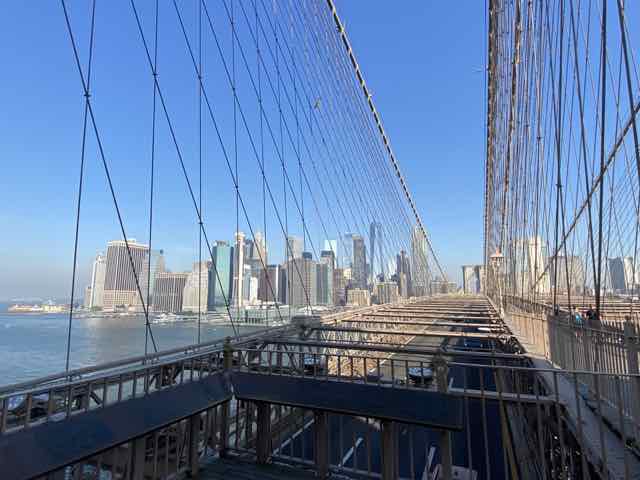
What went in
- Photo
- Brooklyn Bridge walkway
- Notes
- none
- Platform
- Tone
- Story
- Style
- General
What came back
Hook
Looking up into that metal frame.
Caption
Some structures make you stop just to trace the geometry with your eyes. The scale of the metalwork against that wide open blue is hard to ignore.
Hashtags
#bridges #steelwork #urbanarchitecture #bridgephotography #archilovers
Alt text
- Short:A wide-angle view from a suspension bridge shows vertical steel cables stretching down to a roadway with a distant skyline across calm water under a clear blue sky.
- Medium:A wide-angle view from a high suspension bridge walkway shows thin vertical steel cables stretching down to a paved roadway below, with a dense urban skyline visible across calm water under a bright blue sky.
- Long:A high-angle view from a suspension bridge walkway shows thin vertical steel cables stretching down past a metal railing to a paved roadway below, with a dense urban skyline of tall buildings visible across calm water under a bright blue sky. Sloping diagonal cables cross the upper frame, dark informational panels line the foreground walkway edge, and distant stone bridge arches punctuate the horizon under an expansive clear blue sky.
Made in CAPTD's Snapshot on 8 November 2026, on a test build of the live app, and copied here as it came back.
How it works
- Upload a photo (or a video, or up to 10 slides). Add a line of notes if there's something the picture can't say, like where or why.
- Pick the platform. CAPTD has 10, and each one changes what you get: hashtag count, length, whether there's a hook, title or alt text.
- Generate. Every field has its own edit and regenerate, and "Try another angle" tells the caption a different way, so you only redo the bit you don't like. Then "Preview & edit" shows the post as it will look, and "Post to" copies the text and opens the app. You press post yourself: CAPTD never posts for you.
Three ways to do it
Three ways to get the words under a photo. None is wrong; they cost different things.
| What | Writing it yourself | A general AI chatbot | CAPTD |
|---|---|---|---|
| What you give it | Your time and the blank box | The photo plus a prompt that spells out the platform, the length, the tone and the hashtag rules | The photo, the platform and, if you want, a line of notes |
| Platform rules | You check them | Followed if you put them in the prompt | Built in for 10 platforms (for example 5 hashtags and 2,200 characters on Instagram) |
| Alt text | Often skipped | If you ask for it | Up to three lengths in every pack on Instagram, Facebook, Pinterest, X (Twitter), Bluesky and Threads |
| Cost | Free | Depends on the chatbot | 10 free posts, then from €8.99 for 25 |
What you give it
- Writing it yourself
- Your time and the blank box
- A general AI chatbot
- The photo plus a prompt that spells out the platform, the length, the tone and the hashtag rules
- CAPTD
- The photo, the platform and, if you want, a line of notes
Platform rules
- Writing it yourself
- You check them
- A general AI chatbot
- Followed if you put them in the prompt
- CAPTD
- Built in for 10 platforms (for example 5 hashtags and 2,200 characters on Instagram)
Alt text
- Writing it yourself
- Often skipped
- A general AI chatbot
- If you ask for it
- CAPTD
- Up to three lengths in every pack on Instagram, Facebook, Pinterest, X (Twitter), Bluesky and Threads
Cost
- Writing it yourself
- Free
- A general AI chatbot
- Depends on the chatbot
- CAPTD
- 10 free posts, then from €8.99 for 25
FAQ
- What is the best AI caption generator for photographers?
- The one that writes from your photo and sounds like you after you've edited it once or twice. CAPTD was built by a working cameraman for exactly that job, so try it on a photo you know well and judge the result yourself: the first posts are free.
- Does CAPTD look at the photo, or only at what I type?
- At the photo. The caption, hashtags and alt text are written from what is in the frame, plus your notes if you add any. With no notes it can still add a line in the first person, such as how long you looked at something, so read it and cut anything that isn't true.
- Which platforms does it write for?
- Instagram, TikTok, YouTube Shorts, YouTube, LinkedIn, Facebook, Pinterest, X (Twitter), Bluesky and Threads. The free plan covers Instagram, TikTok and Facebook; every paid plan has all 10.
- Is it free?
- The first 10 posts are free on Instagram, TikTok and Facebook, for the life of the account, and you don't need to sign up. After that, plans start at €8.99 paid once for 25 posts.