Get a caption from a photo, without writing a prompt
Upload the photo and CAPTD writes the caption from what is in it: the subject, the light, the setting. You don't write a prompt; you can add a line of notes if you want to. It's for anyone posting their own pictures, and the first 10 are free with no account.
A real example
Real CAPTD output, uneditedOnly the photo, no notes at all, for Instagram. Everything below came from the picture.
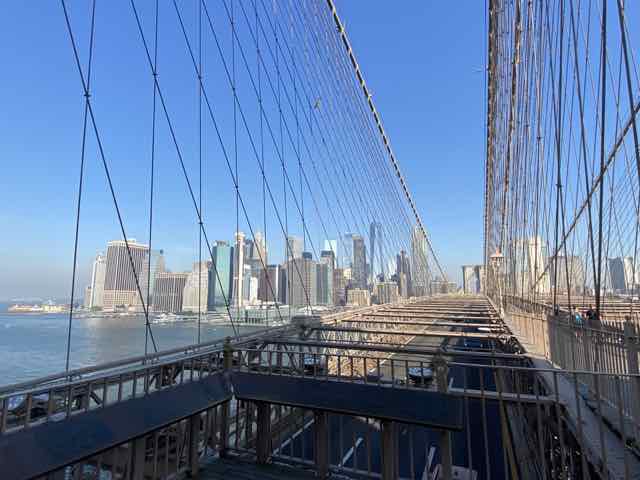
What went in
- Photo
- Brooklyn Bridge walkway
- Notes
- none
- Platform
- Tone
- Story
- Style
- General
What came back
Hook
Looking up into that metal frame.
Caption
Some structures make you stop just to trace the geometry with your eyes. The scale of the metalwork against that wide open blue is hard to ignore.
Hashtags
#bridges #steelwork #urbanarchitecture #bridgephotography #archilovers
Alt text
- Short:A wide-angle view from a suspension bridge shows vertical steel cables stretching down to a roadway with a distant skyline across calm water under a clear blue sky.
- Medium:A wide-angle view from a high suspension bridge walkway shows thin vertical steel cables stretching down to a paved roadway below, with a dense urban skyline visible across calm water under a bright blue sky.
- Long:A high-angle view from a suspension bridge walkway shows thin vertical steel cables stretching down past a metal railing to a paved roadway below, with a dense urban skyline of tall buildings visible across calm water under a bright blue sky. Sloping diagonal cables cross the upper frame, dark informational panels line the foreground walkway edge, and distant stone bridge arches punctuate the horizon under an expansive clear blue sky.
Made in CAPTD's Snapshot on 8 November 2026, on a test build of the live app, and copied here as it came back.
How it works
- Drop the photo in. It's compressed in your browser, and all metadata, GPS included, is removed before upload.
- Leave the notes empty, or add the one thing the photo can't show: a name, a place, why it matters.
- Generate. If the caption isn't right, try another angle, regenerate just the caption or pick a different tone, and keep the rest.
Three ways to do it
Starting from a picture rather than from words.
| What | Writing it yourself | A general AI chatbot | CAPTD |
|---|---|---|---|
| Where the words come from | Your memory of the moment | Your prompt, plus the photo if you attach it | The photo first; your notes, if any, on top |
| When there are no notes | Blank box | Writes what the prompt asks for; you check it against the photo | Writes from what it can see; check any line about you that you didn't give it |
| Your photo's privacy | Stays with you | Depends on the service | Metadata and GPS stripped in the browser before upload; uploads deleted within 90 days |
Where the words come from
- Writing it yourself
- Your memory of the moment
- A general AI chatbot
- Your prompt, plus the photo if you attach it
- CAPTD
- The photo first; your notes, if any, on top
When there are no notes
- Writing it yourself
- Blank box
- A general AI chatbot
- Writes what the prompt asks for; you check it against the photo
- CAPTD
- Writes from what it can see; check any line about you that you didn't give it
Your photo's privacy
- Writing it yourself
- Stays with you
- A general AI chatbot
- Depends on the service
- CAPTD
- Metadata and GPS stripped in the browser before upload; uploads deleted within 90 days
FAQ
- Do I have to type anything?
- No. A photo on its own is enough. Notes help when the photo can't say something itself, like the name of a place or who is in it.
- What happens to my photo?
- It's resized in your browser and every bit of metadata, GPS included, is removed before upload. The copy CAPTD analyses never changes your original file.
- Can it do several photos at once?
- Yes: batch upload gives each photo its own caption, on paid plans (from 10 photos per batch on Basic). Slideshow writes one post with a caption for every slide.