Alt text for Instagram, written from the photo
CAPTD writes alt text for your photo in up to three lengths, aiming for about 28, 43 and 68 words, describing only what is visible, with no marketing language. It's for anyone who wants people using screen readers to get the photo too, without writing the description by hand. It comes in every pack on Instagram, Facebook, Pinterest, X (Twitter), Bluesky and Threads, and the first 10 posts are free.
A real example
Real CAPTD output, uneditedThe Pantheon, no notes, for Instagram. The three alt text versions as written, shortest first.
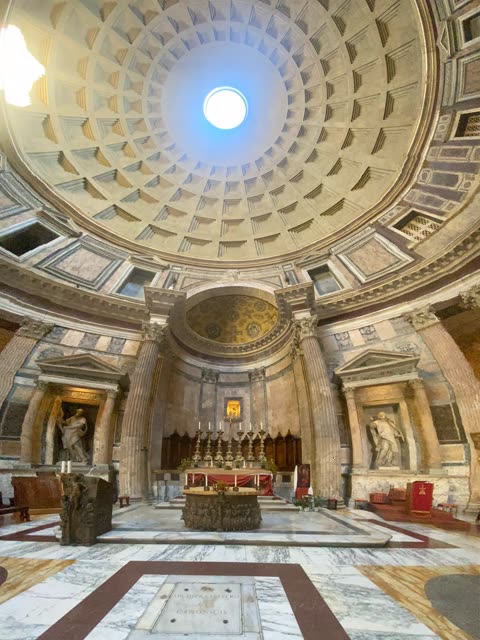
What went in
- Photo
- Inside the Pantheon, Rome
- Notes
- none
- Platform
- Tone
- Story
- Style
- General
What came back
Alt text
- Short:A wide-angle interior photograph of a grand historic building interior showing a massive coffered dome overhead, a central circular oculus letting in light, and an altar on a marble floor.
- Medium:A wide interior photograph looking upward inside a massive round stone building featuring a large coffered dome, a central circular oculus at the peak, towering columns, statues in wall niches, and an altar below.
- Long:A wide interior photograph looking straight upward inside a massive round stone building with a large coffered dome, featuring a bright circular oculus at the exact peak, concentric square patterns lining the curved ceiling, tall fluted marble columns supporting ornate cornices, statues standing within recessed architectural alcoves, a central raised altar adorned with a row of burning candles, and a polished patterned marble floor with inlaid geometric sections in shades of white, grey, and dark brown.
Made in CAPTD's Snapshot on 8 November 2026, on a test build of the live app, and copied here as it came back.
How it works
- Upload the photo and pick the platform you're posting to.
- Generate. The alt text arrives with the caption, in up to three versions; pick the length that fits.
- On Instagram, paste it under Advanced settings → Accessibility → Write alt text.
Three ways to do it
Three ways to fill the alt text field.
| What | Writing it yourself | A general AI chatbot | CAPTD |
|---|---|---|---|
| What it describes | What you remember is there | What you ask for | Only what is visible: subject, setting, light, background |
| Tone | Varies | Depends on the prompt | Plain description, not a rephrase of the caption |
| Length | Usually one line | One version | Up to three, aiming for about 28, 43 and 68 words |
What it describes
- Writing it yourself
- What you remember is there
- A general AI chatbot
- What you ask for
- CAPTD
- Only what is visible: subject, setting, light, background
Tone
- Writing it yourself
- Varies
- A general AI chatbot
- Depends on the prompt
- CAPTD
- Plain description, not a rephrase of the caption
Length
- Writing it yourself
- Usually one line
- A general AI chatbot
- One version
- CAPTD
- Up to three, aiming for about 28, 43 and 68 words
FAQ
- How long should alt text be on Instagram?
- Instagram allows up to 1,000 characters. A short description of the subject and setting is the minimum; the longer CAPTD versions add composition, light and background for readers who want more.
- Can I change the alt text?
- Yes. Like every field in the pack it has Edit and Regenerate, so you can add a name or a detail only you know, such as who is in the photo.
- Which platforms get alt text?
- Instagram, Facebook, Pinterest, X (Twitter), Bluesky and Threads: the platforms with an alt text field for posts.