A sound idea that fits the post, ready to search
With an Instagram, Facebook, TikTok or YouTube pack, CAPTD suggests the kind of sound that fits the photo or clip: a mood, a genre, a tempo and 2 or 3 search terms to paste into the app's own music search. It never names a track, so you choose the actual sound in the app, from what it already lets you use. It's part of the free plan's 10 posts.
A real example
Real CAPTD output, uneditedSailboats at sunset, no notes, Instagram, Poetic tone. The music block as the workspace shows it, with the caption it came with.
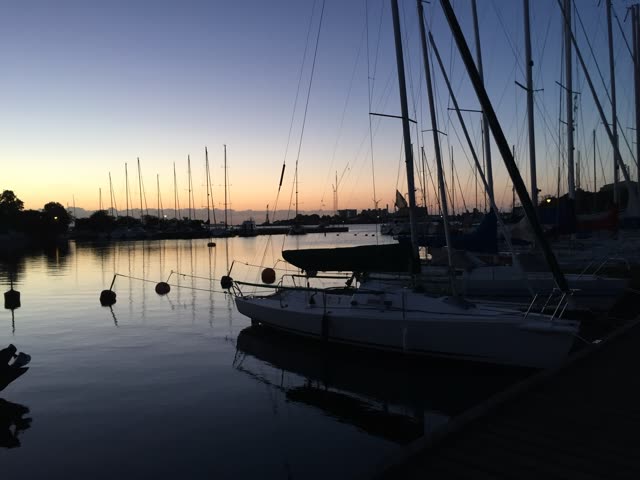
What went in
- Photo
- Sailboats in a harbour at dusk
- Notes
- none
- Platform
- Tone
- Poetic
- Style
- General
What came back
Music
ambient · calm and quiet · ~70 BPM
Paste into the music search:
- ambient piano
- calm acoustic
- quiet instrumental
Caption
Boats in the harbour Nothing moving. Not the boat, not the water. I couldn't look away.
Hashtags
#sailboats #harbour #harbourphotography #landscapephotography #waterscape
Made in CAPTD's Snapshot on 8 November 2026, on a test build of the live app, and copied here as it came back.
How it works
- Upload the photo or video and pick Instagram, Facebook, TikTok or YouTube.
- Generate. The Music block gives a genre, a mood, a tempo in BPM and 2 or 3 search terms; tap a term to copy it.
- In the app, open the music or sound search, paste the term and pick a sound you like from what comes up.
Three ways to do it
Finding a sound for a post.
| What | Writing it yourself | A general AI chatbot | CAPTD |
|---|---|---|---|
| Where you start | Scrolling the app's trending sounds | A list of songs you ask for; you check each one exists and can be used | Search terms for the app's own library, picked for this photo or clip |
| Fits the post | Your judgement | If you describe the mood | Mood, genre and tempo chosen from what's in the photo or clip |
| Rights | Whatever the app allows | Yours to check for every song | Nothing to license: you pick the sound inside the app, from what it lets you use |
Where you start
- Writing it yourself
- Scrolling the app's trending sounds
- A general AI chatbot
- A list of songs you ask for; you check each one exists and can be used
- CAPTD
- Search terms for the app's own library, picked for this photo or clip
Fits the post
- Writing it yourself
- Your judgement
- A general AI chatbot
- If you describe the mood
- CAPTD
- Mood, genre and tempo chosen from what's in the photo or clip
Rights
- Writing it yourself
- Whatever the app allows
- A general AI chatbot
- Yours to check for every song
- CAPTD
- Nothing to license: you pick the sound inside the app, from what it lets you use
What it is, and isn't
- A direction to search with, not an audio file and not a song title: CAPTD doesn't attach or license music.
- The genre and the search terms are in English, because that's how the apps' music libraries are searched; the mood follows the language of your pack.
- Only on Instagram, Facebook, TikTok, YouTube Shorts and YouTube; the other platforms don't use sound in posts.
- You can edit the genre, mood, tempo and terms, or regenerate the block on its own.
FAQ
- Does it tell me which song to use?
- No, on purpose. It gives a mood, a genre, a tempo and search terms. A named song can't be checked from here, and the app's own library already has sounds you're allowed to use on that platform.
- Where do I paste the search terms?
- On Instagram, tap the music note in the Reels editor and search there. On TikTok, use the sound search or the Commercial Music Library if you have a Business account; on YouTube, the YouTube Audio Library in YouTube Studio.
- Does it add the music to my video?
- No. You add the sound in the app you post with, so it stays a sound that app has cleared.